Manual Entry (MOTO)
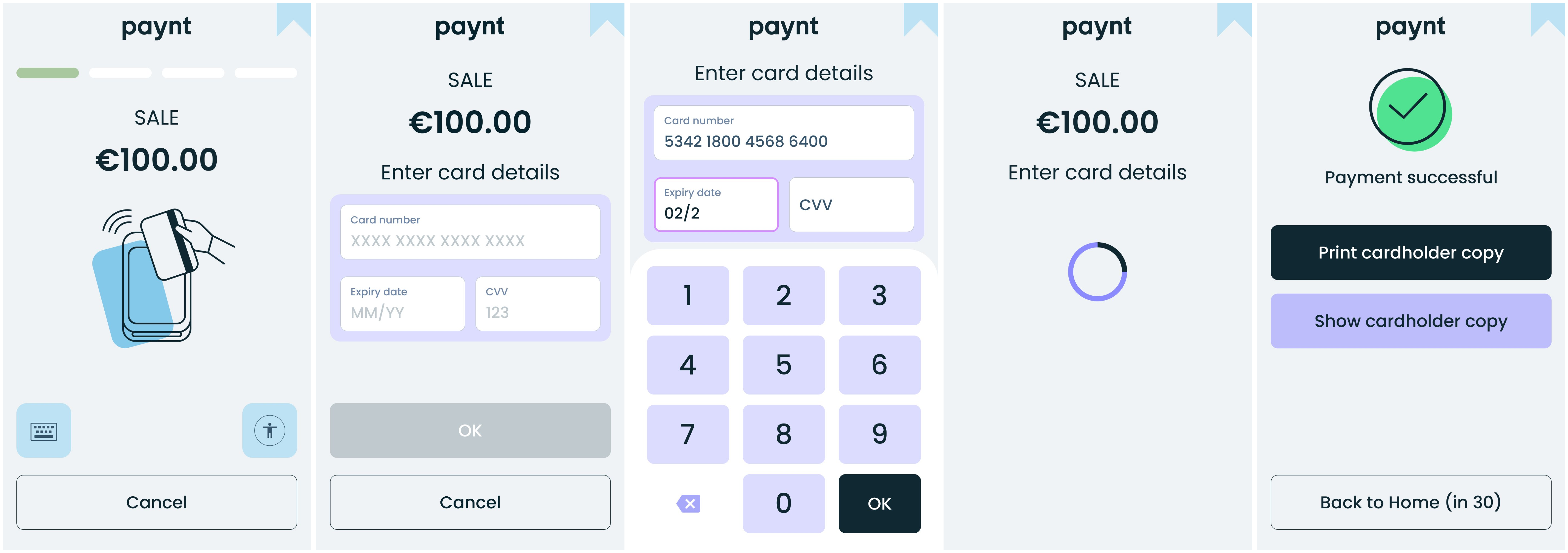
Manual entry can be used on any screen where the app is asking to present the card (sale, refund, pre-authorization).
This is used for Mail Order/Telephone Order transactions.
- When prompted to present the card, select the manual entry option.
- Enter the card number manually.
- Enter the expiry date.
- Enter the CVV if required.
- Proceed with the transaction.
Card Presentation Methods
Customers can present their card in three ways:
| Method | Description |
|---|---|
| Chip (ICC) | Insert the card into the chip reader slot |
| Contactless (NFC) | Tap the card or mobile wallet on the contactless reader |
| Swipe (MSR) | Swipe the card through the magnetic stripe reader |